
TeamLive
HarriBusiness
4.7665.00 Reviews
- Version
- 1.10.11
- Installs
- 100.00K
- Age Rating
- Everyone
Screenshots


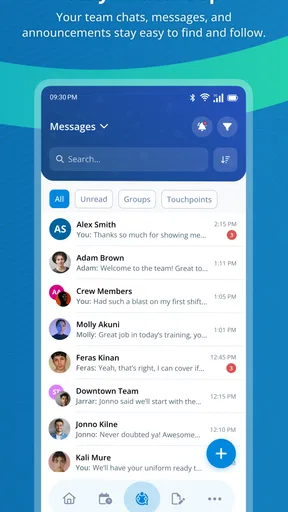
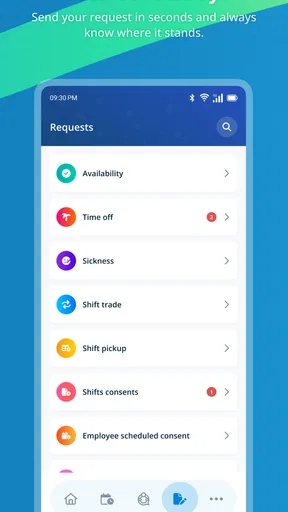
Our Review of TeamLive
 Analysis by Appyee
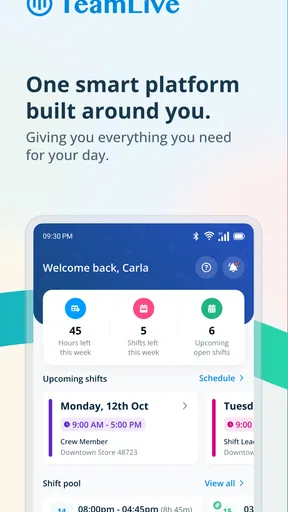
When a workplace depends on people arriving at the right place and time, scattered messages and last-minute schedule changes become a real problem. TeamLive approaches that problem as a business app built around staff scheduling and team communication. I found its appeal easy to understand: instead of treating a rota, an announcement, and a shift-related conversation as separate tasks, it puts them under one roof.
That focus makes it more practical for hospitality and other shift-based teams than a general chat app. It is not trying to replace every business tool, and that is important to understand before installing it. Its value comes from keeping everyday coordination close to the schedule. If your workday is organized around shifts, availability, and quick updates, that can remove a surprising amount of friction.
Harri is the developer behind the app, which is available free of charge and carries an Everyone content rating. It belongs in the business category rather than the general social or productivity space, and that distinction shows in the way I would use it: as a work companion for organized teams, not as a personal planner or casual messenger.
How TeamLive feels in everyday work
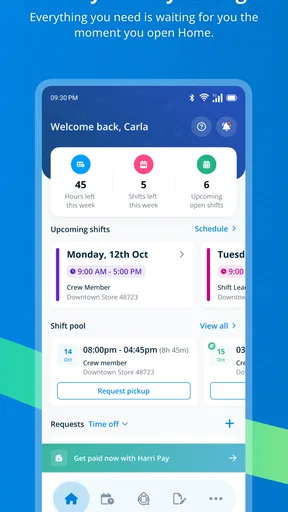
The first thing I noticed is that the app makes most sense when several people need the same operational information. A manager may need to publish a rota, employees may need to check when they are working, and the whole team may need to receive a change or reminder. Keeping those activities connected is more useful than asking staff to search through unrelated conversations or remember which calendar contains the latest version.
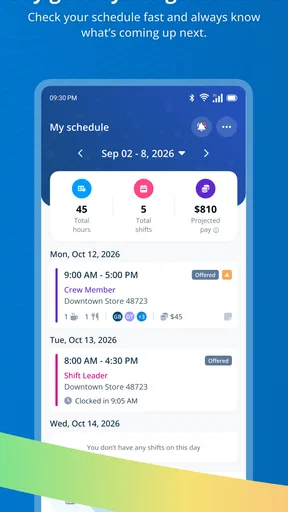
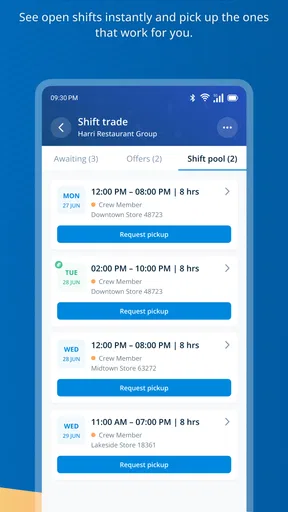
A realistic example would be a busy restaurant team preparing for a weekend service. A staff member can open the app before leaving home, check the shift they are expected to work, and look for communication connected with the team. If a manager changes the plan, the employee has a better chance of seeing the update in the same work-focused place rather than relying on a private message, a noticeboard, or a group chat that is also filled with unrelated conversation.
That workflow is especially helpful for people who work irregular hours. A conventional calendar is good at showing appointments, but it usually does not understand the difference between a work rota and a personal event. A messaging app is good at conversation, but it is a poor substitute for a clear schedule. TeamLive sits between those two familiar options, combining the parts that shift workers actually check most often.
I would not describe it as a universal employee-management system based only on the experience of using the mobile app. Its strongest role is daily visibility: knowing what is happening, when it is happening, and what the team needs to know. Businesses that need deep payroll, accounting, recruitment, or document-management functions will likely still need dedicated tools alongside it.
The main benefit is shared context
The practical strength here is not simply having a calendar on a phone. It is having scheduling and communication treated as related parts of the same work routine. When a shift is viewed in isolation, an employee may still need to search elsewhere for instructions or changes. When communication is separated from scheduling, important context can disappear into a busy chat.
For a small team, that shared context can make handovers easier. A person starting a shift can review the current plan before asking basic questions, while a manager can communicate with the people affected by the schedule instead of repeating the same message individually. I see this as one of the app’s less obvious advantages: it can reduce the number of small interruptions that consume attention during a busy day.
There is also a useful distinction between information that belongs to one employee and information that belongs to the team. A personal calendar may show me that I have work, but it does not necessarily help me understand the wider staffing picture. A general chat may show team messages, but it does not necessarily present the schedule in a structured way. TeamLive is most convincing when both views matter.
Who will get the most from it
I would recommend trying it first if you work in a shift-based environment where schedules change, staff need regular updates, and not everyone sits at a desk. Hospitality teams are an obvious fit, but the broader idea also suits businesses where employees need to check work information from a phone rather than from a fixed office computer.
It can also be useful for employees who do not want work communication mixed with personal messaging. Keeping a work-focused app separate makes boundaries clearer, even if it does not eliminate notifications or interruptions entirely. For managers, the advantage is having a central place to direct staff instead of maintaining several overlapping channels.
The app is less compelling for a freelancer, a very small team with a stable timetable, or an office where everybody already works from one shared calendar and a well-managed communication platform. In those cases, adding another app may create more maintenance than value. The decision depends on whether scheduling and team communication are currently causing confusion. If they are not, TeamLive may feel unnecessary.
What the current release tells me
The current version is listed as 1.10.11, and the app has been available since October 18, 2016. That history matters because this is not a brand-new experiment built around a single fashionable feature. It suggests a product that has had time to remain part of a workplace routine, while the current version gives existing users a clear point of reference when checking compatibility and updates.
I would be careful not to treat a version number as proof that every workplace workflow has been modernized. A mature app can be dependable while still feeling narrower than newer all-in-one platforms. What I can say from using it is that its identity remains clear: it is centered on schedules and communication rather than trying to become an enormous business suite.
For people already using an earlier release, the most important question is not whether the interface looks completely different. It is whether the current app continues to make the daily routine reliable: opening the schedule, understanding the next shift, and finding relevant team information without unnecessary searching. Existing users should judge the update by those repeated tasks rather than by the version label alone.
The minimum operating-system requirement is Android 7.0. That is a relatively broad compatibility point for people using older Android phones, although workplace administrators should still consider the age and security condition of the devices their staff use. An app can support an older system while the overall phone experience remains slow or unreliable, especially when employees depend on it for time-sensitive updates.
How it compares with familiar alternatives
The usual alternative is a combination of a calendar, a group-chat service, and perhaps a spreadsheet. That arrangement can work, but it places the burden on the manager to keep several sources synchronized. One tool may contain the official rota, another may contain the latest change, and a third may hold an informal discussion. TeamLive is more attractive when the cost of that split is missed information or repeated explanations.
A general workplace collaboration platform may offer more file sharing, meetings, integrations, and administrative controls. If your organization needs broad project management, that kind of platform is probably the better center of gravity. TeamLive has a more specific advantage: it keeps the experience closer to the everyday rhythm of shifts, where a worker may only need to confirm timing and read a short operational message.
A paper noticeboard is still simple and visible, but it depends on people being physically present and seeing the latest sheet. A spreadsheet can be flexible, yet it often requires careful formatting and a disciplined process for announcing changes. TeamLive is preferable when employees need mobile access and managers want the schedule and team communication to live in the same work environment.
The trade-off is that a focused app may not satisfy every organization. If your team already has an established communication system that everyone checks consistently, moving only the schedule into another place could make matters worse. The app works best when the business commits to one clear source of truth instead of letting TeamLive compete with several unofficial channels.
Small workflows that make a difference
My first practical tip is to establish a simple rule for schedule changes: the app should be the place where the final version is posted, while other channels can point people back to it. This avoids the common situation where a message says “check the new rota” but nobody knows which copy is authoritative. The benefit is organizational rather than flashy, but it is exactly the kind of habit that determines whether a scheduling app succeeds.
My second tip is to check the app at a deliberate moment rather than leaving it open as a constant distraction. For example, a worker can review the next shift before finishing the day and then look again before traveling to work. This turns the app into a reliable routine and reduces the temptation to depend on memory or old screenshots. It also helps separate genuine schedule information from casual team conversation.
A third useful approach is to use communication with the schedule in mind. A short message that identifies the affected shift, location, or group is easier to act on than a vague announcement. Even without adding extra tools, managers can make the app more effective by writing updates that answer the immediate question: what changed, who needs to know, and when does it take effect?
There is a further trade-off for managers. Centralization saves time only if the information is maintained carefully. If staff see outdated schedules, contradictory messages, or frequent corrections, confidence in the app will fall quickly. TeamLive can provide the shared place, but the workplace still needs a clear owner for publishing and correcting information.
Where the experience may fall short
The app’s focused design can feel limiting if you expect a full business operating system. A schedule and communication hub does not automatically cover every administrative process a company may have. Businesses with complex approval chains, detailed reporting needs, or specialized integrations should compare it with broader workforce-management products before making it the only tool.
There is also a human limitation: not every employee will check a work app with the same consistency. A manager may assume that publishing an update guarantees it has been read, while an employee may open the app only when thinking about the next shift. For urgent matters, a workplace may still need a separate escalation process. I would not use any scheduling app as the sole answer for emergencies.
Another point is notification discipline. If every minor conversation produces an interruption, employees may mute the app and miss something important later. If notifications are too quiet, the app loses some of its value as a communication channel. Teams should agree on what deserves an alert and what can wait until the next scheduled check.
People who prefer highly customizable personal planning may also find the business-first approach less satisfying than a dedicated calendar or task manager. TeamLive is designed around shared work information, not around building an elaborate private productivity system. That is a strength for clarity, but a limitation for users who want extensive personal organization.
What the audience and adoption suggest
The app has an average rating of 4.7 from around 6.6 thousand ratings, with more than 100 thousand installs. Those figures indicate meaningful adoption and a generally positive response, but I would interpret them in context. A high rating tells me that the core experience works well for many people who need this specific kind of coordination; it does not prove that the app is the right fit for every business model.
The review count is around 665, which gives prospective users some public feedback to consider without turning the rating into a guarantee. In practice, the most useful test is whether the app matches the way your team already works. A strong score cannot compensate for a workplace that needs functions outside scheduling and communication, just as a focused design may be exactly right for a team tired of juggling multiple channels.
Because it is free, the barrier to trying it is lower for a small team or an individual employee evaluating the experience. Still, the real cost is not the download; it is the time spent introducing a new routine. Before rolling it out widely, I would test one normal scheduling cycle, including a change, a team message, and a handover. That reveals more than a quick look at the opening screen.
Questions I would settle before rollout
One question many users will have is whether it can replace their existing calendar. My answer is: treat it as the work schedule first, not automatically as a complete replacement for personal planning. I would continue using a personal calendar for appointments and private commitments, then use TeamLive as the authoritative place for team shifts and work communication.
Another question is whether it suits employees who rarely use business software. The mobile focus helps, because staff can check work information without sitting at a computer, but simplicity also depends on the team’s setup. Managers should keep the process consistent and avoid publishing the same information in several confusing formats.
Users may also wonder whether the free price makes it suitable for a whole organization. It makes initial evaluation easier, but suitability still depends on the employer’s workflow and expectations. I would confirm that the app covers the team’s required scheduling and communication habits before treating it as a long-term replacement for other systems.
For someone choosing between TeamLive and a broader collaboration platform, I would ask what problem needs solving first. If the answer is “we cannot keep shifts and team updates aligned,” TeamLive has a focused reason to exist. If the answer is “we need project documents, meetings, approvals, and extensive integrations,” a broader platform may be a better foundation, with scheduling handled separately if necessary.
What I would watch as a user
For existing users, I would watch how future releases handle the balance between stability and expansion. The app benefits from keeping its main workflow understandable. Adding more business functions could help larger teams, but too much complexity would weaken the quick check that makes a mobile scheduling tool useful.
I would also pay attention to how smoothly the app fits into changing workplace habits. Teams increasingly expect information to be available away from a desk, but that does not mean every employee wants a stream of constant alerts. The best evolution would preserve fast access to the schedule while making communication easier to manage and less disruptive.
Compatibility remains worth monitoring as well. The current minimum of Android 7.0 makes the app accessible to a wide range of devices, yet older phones and operating systems eventually raise practical questions about performance and security. Businesses should review the condition of staff devices as part of any rollout rather than assuming software compatibility alone guarantees a good experience.
My overall view is favorable, with a clear boundary. TeamLive is a sensible choice for shift-based teams that need one mobile place for schedules and work communication. I like its focused purpose, its free entry point, and the way it can replace a messy combination of spreadsheets, chat threads, and noticeboards. I would recommend it to a manager who wants to establish one dependable routine for staff.
I would skip it if your team already has a trusted system that handles the same job, or if you need a much broader business platform. Its success depends on consistent use and accurate updates, not on installation alone. For the right workplace, though, the strongest reason to choose TeamLive is clarity: everyone knows where to look for the current plan and the conversation around it.
With an Everyone rating, a current version of 1.10.11, and a long presence in the business-app space, it is easy to approach as a practical work tool rather than a novelty. I would start with a small trial, define which information belongs there, and see whether the next scheduling cycle produces fewer questions and fewer conflicting messages. If it does, the app has earned a permanent place in the team’s routine.
Verdict
Strengths of TeamLive
- Simple team communication with chats, calls, and shared updates.
- Useful for coordinating remote teams across different locations.
- Supports quick file and information sharing within conversations.
- Notifications help users stay updated on important team activity.
- Clean interface makes core collaboration tools easy to find.
Limitations of TeamLive
- Some features may require a paid plan or organizational subscription.
- Notification volume can become distracting in highly active teams.
- Requires a reliable internet connection for calls and live updates.
- Limited integrations may reduce usefulness with other work platforms.
- New users may need time to understand all team management options.
Similar Picks in This Category
View All
LinkedIn: Community & Network
LinkedIn3.8

Zoom Workplace
zoom.com4.1

Microsoft Teams
Microsoft Corporation4.6

Meta Business Suite
Meta Platforms, Inc.4.6

Webex Meetings
Cisco Systems, Inc.4.5

TeamViewer Remote Control
TeamViewer4.4
Frequently Asked Questions
What is TeamLive and what can I use it for?
TeamLive is a team communication and collaboration app designed to help groups stay connected, organize conversations, and coordinate work from a mobile device. Depending on the version and account setup, users may be able to participate in team chats, share updates, manage discussions, and receive notifications. It is best suited to workplaces, clubs, project groups, and other teams that need a central communication space.
Is TeamLive free to download and use?
TeamLive may be available to download at no initial cost, but the features and usage limits can depend on the plan offered by the developer or the organization managing your account. Some tools may require a subscription, an invitation, or an active team workspace. Before downloading, check the current Google Play Store or App Store listing for pricing, in-app purchases, and any business-related requirements.
Do I need an invitation or company account to use TeamLive?
In many cases, TeamLive is intended for members of an existing team or organization rather than completely independent users. You may need an invitation, access code, company credentials, or a workspace created by an administrator before you can use all of its functions. If registration does not work immediately, contact your team administrator and confirm that your email address or phone number has been added correctly.
What permissions and device requirements does TeamLive need?
The permissions required by TeamLive can vary according to the features you use. Messaging and collaboration tools commonly request access to notifications, internet connectivity, and sometimes the microphone, camera, contacts, files, or photos for calls and content sharing. Review the permission prompts carefully and allow only what you need. Also verify that your Android or iOS version is supported and that your device has enough storage.
Is TeamLive secure for sharing team conversations and files?
TeamLive may include standard protections such as account authentication, encrypted connections, and administrator controls, but users should still avoid treating any online platform as completely risk-free. Use a strong, unique password, enable available security options, and avoid sharing confidential information in channels with broad access. Organizations should also review the app’s privacy policy, data practices, retention rules, and administrator settings before adopting it for sensitive work.
